

Paul is the founder of PAZ Analytics. He has worked in digital analytics and marketing since 2012 and led teams at Nike, YETI, Yodle and Dutchie. He started PAZ as a side business in January 2019 and has run it full-time since March 2024.
LLM visibility: how to measure your brand's AI search visibility
Prompt tracking, AI Overview tracking, GA4 and platform data each show a different part of how AI tools present a brand.
SEO + GEO
November 16, 2026
Paul Zwicker
Founder and CEO
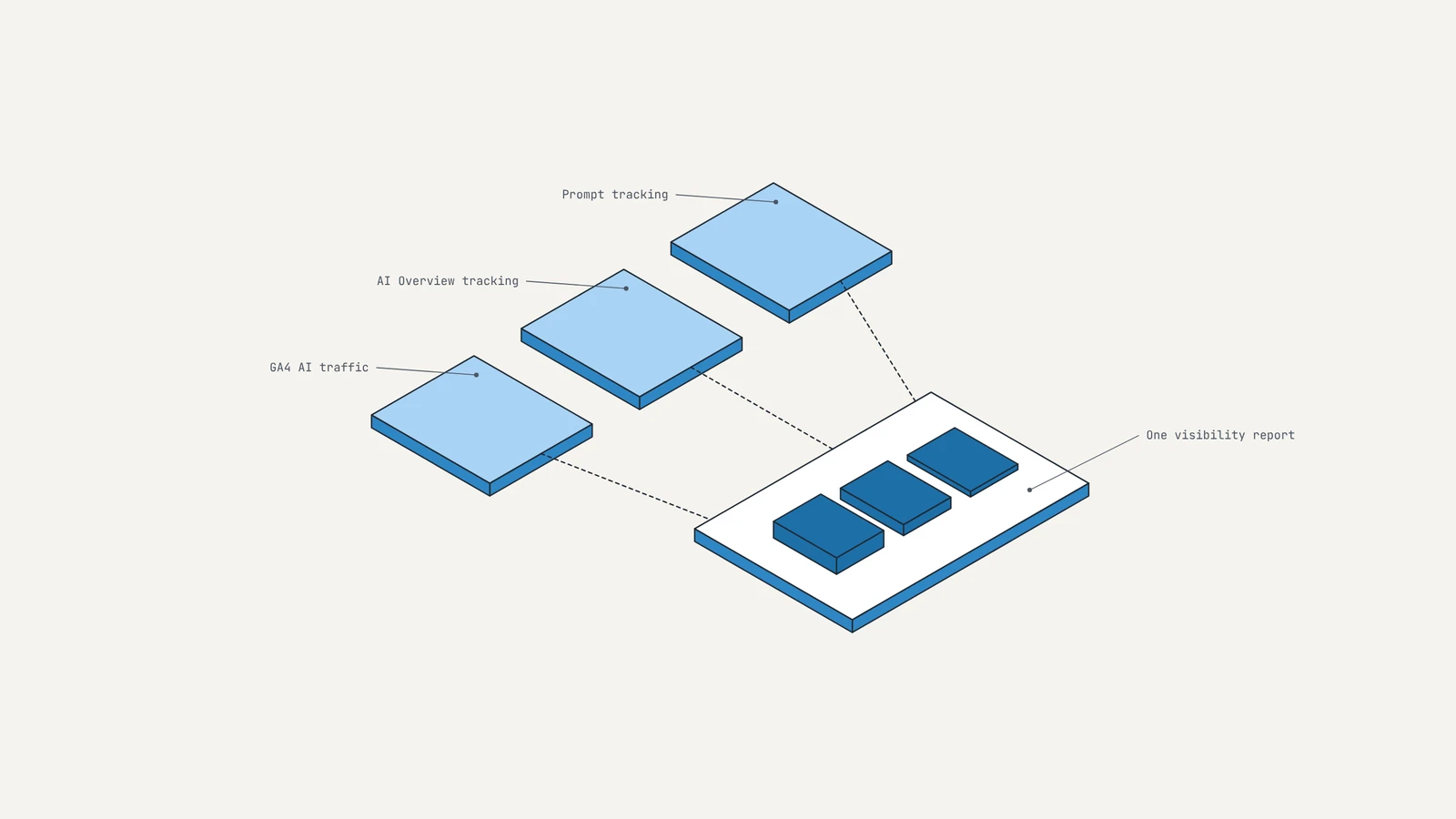
Marketing and ecommerce leaders know buyers search and discover in ChatGPT, Google AI Overviews, Claude, Perplexity, etc. These leaders want their brand to appear in chatbots' answers and they want to track where, when, and how. PAZ helps our clients get this insight with three sources: prompt tracking across AI assistants, rank tracking that records AI Overview placements, and GA4. Each source measures a different part of visibility, and each misses something another one records. Google and OpenAI now report some platform data as well, though neither platform shows the prompts behind its counts or what visitors do after they click.
What is LLM visibility?
LLM visibility is how often a brand appears in answers from AI assistants and AI search features such as ChatGPT, Claude, Gemini, Perplexity and Google AI Overviews. It measures whether these tools name or link to the brand when a buyer asks about its category. ChatGPT visibility and AI Overview visibility (along with other chatbots) are individual parts of the same overall measurement system.
PAZ separates LLM visibility into three levels. A mention means the answer names the brand. A citation means the answer links to the brand's website. A click means a person follows that link to the site. The three levels do not necessarily happen together. An answer can name a brand without linking to it. A cited page can send no visits.
Each level needs a different measurement source. Prompt tracking tools record whether a brand appears in answers to a chosen set of prompts. Rank trackers record AI Overview appearances for tracked keywords. Site analytics records clicks, but only when the visit arrives with data that identifies the AI tool.
How to track AI visibility: the three sources PAZ uses
PAZ tracks AI visibility with three sources that each answer a different question. Prompt tracking shows whether the brand appears in AI assistant answers to the questions that matter to its buyers. Rank tracking that records AI Overview placements shows whether the brand appears in Google's AI summaries for tracked keywords. Site analytics shows whether people arrive from AI tools and what they do after they land. PAZ combines all three because no one source covers mentions, citations and clicks.
Platform-reported data is a fourth source with limited detail so far. Google Search Console has a generative AI report that shows impressions but no clicks or queries, according to PPC Land. On November 10, 2026, OpenAI opened Businesses in ChatGPT, a beta program that lets a business claim a profile in ChatGPT. OpenAI's reporting portal, Business Hub, shows mentions, profile views, website clicks and the top five discovery topics over seven-day and 28-day windows, according to PPC Land's launch coverage. OpenAI describes discovery topics as common themes across conversations where the business's website is cited.
Eligibility for Business Hub depends on industry, location and OpenAI's verification checks. Launch coverage focused on U.S. ecommerce and online service businesses. A business verifies ownership through a call or text to its main phone number or through DNS. OpenAI then requires a government-issued ID before anyone can edit the profile, per Search Engine Roundtable. Shopify merchants can connect their store from Business Hub or the Shopify admin. OpenAI lists no fee for claiming a profile.
Prompt tracking for ChatGPT
Since September 2026, PAZ has pulled Semrush's ChatGPT prompt tracking into its BigQuery data pipeline. Semrush runs ChatGPT prompt tracking as a separate Position Tracking project. Each client has a ChatGPT tracking project next to its Google rank tracking project. Each ChatGPT project runs a fixed list of prompts that PAZ chooses for commercial intent. Tool limits set the size of that list. Exploding Topics, which Semrush owns, lists Semrush's daily tracking of up to 25 prompts and Profound's 50 and 100 prompt tiers as examples of the prompt limits in LLM visibility tracking tools.
Because the prompt list decides what the tracking can show, choosing it is the first decision in LLM visibility tracking. A useful list starts with the questions a buyer asks before choosing a brand in the category. Those include which product fits a specific need, how two options compare and which provider to use in a given area. Prompts that contain the targeted brand's name stay off the list. A prompt that names the brand says little about whether ChatGPT recommends the brand to a buyer who has not heard of it. The list then stays fixed so that each run asks the same questions and any movement in the results comes from changes in the answers.
A fixed prompt set shows whether the brand appears for the prompts PAZ picked. It does not show how many people saw the brand. Business Hub reports mention counts for eligible businesses, which helps, but the tool does not say which prompts produced them, complicating prompt-tracking optimization.
AI Overview tracking
Rank trackers (including PAZ's custom tracker) record when a tracked keyword returns a Google AI Overview and whether the brand is cited. PAZ uses its own internal tracker and Semrush's Position Tracking to track these citations. Tracking AI visibility is now a must for any organic program.
For one of PAZ's clients, a multi-location fitness brand, AI Overview placements tracked went from 8 to 158 in a single quarter. The account also ran Google's AI Max for Search that quarter. A natural question surfaced: Was the surge in visibility driven by paid, or was it all organic?
Paid and organic placements can now appear in the same AI Overview. Each is counted in a different place. An organic placement is a citation: Google links to the brand's page as a source for the answer. A paid placement is an ad that Google shows in a separate section labeled Sponsored. Google's Ads help documentation says Search, Shopping and Performance Max campaigns can all serve there. AI Max and broad match can also match an ad to the AI response, in addition to the search query.
Rank trackers count the organic side. Semrush counts an AI Overview placement only when the tracked domain is cited as a source. Semrush's documentation says Position Tracking records that citation as a #1 ranking. Sponsored ads are not source citations. AI Max placements therefore do not inflate the count. The 158 placements in our client's example therefore are organic. The paid side has no equivalent report. Semrush notes that Google Ads does not show which paid queries trigger AI Overviews. A brand can see its organic citations but not how often its ads appeared in the same answers without custom tracking on top of Semrush tools.
A rising citation count can be reported as organic visibility. When paid search runs on the same keywords, the brand may appear in an AI Overview twice: once as a cited source and once as a sponsored placement. The citation count captures only the organic result.
AI traffic in GA4
GA4 is the only one of the three sources that connects LLM visibility to sessions, conversions and revenue. Google added a native AI Assistant channel to GA4's Default Channel Group on May 13, 2026, according to SEO Sherpa. The channel classifies only visits that include a recognized AI chatbot referrer. Google did not reclassify data from before May 13. Those earlier visits are still in GA4 under their original source and medium, such as chatgpt.com / referral. A custom channel group that matches AI sources with a regex and sits above Referral applies to historical data. It backdates AI traffic to before May 13 and gives a continuous trend line. The same group also catches assistants the native channel leaves in Referral, such as Perplexity and Claude. No channel group can recover AI visits that arrived without a referrer. Those stay in Direct, before and after May 13.
SEO Sherpa also cites research estimating that 60% to 80% of AI-originated visits include a clean referrer. The other 20% to 40% arrive without one. GA4 counts those visits as Direct, which means the AI Assistant channel undercounts AI traffic. Clicks from Google AI Overviews and AI Mode stay in Organic Search, mixed in with other Google organic clicks.
Tracking AI crawlers
GA4 measures all site visitors, including both human and bot. AI tools also send automated visitors: crawlers that fetch pages to use in answers, and agents that browse sites on a user's behalf. GA4 does not differentiate either from Direct traffic unless the traffic arrives with a referrer. On pazanalytics.com, we've established a mechanism that matches user agent data to known AI crawlers. It records when AI tools fetch a page, which shows which pages AI tools use in answers and in agent sessions, even when no person visits. It can also help us track traffic from AI assistants, such as Meta's Muse and OpenAI's Dots. We're rolling this mechanism out to client sites to see how it holds across industries, especially ecommerce.
What prompt tracking cannot show
Prompt tracking cannot show how many people saw a brand in an AI answer or what those people did next. Three limits explain why. Because ChatGPT can return different answers to the same prompt across runs and across users, one reading of a prompt is just one sample. A fixed prompt list is also a sample that PAZ chose. It may not match the questions buyers ask most often. The third limit is volume. No tool reports prompt volume from the AI companies. Tracking therefore treats a rarely asked prompt the same as a common one.
Platform data answers part of the first question and none of the second. Search Console's generative AI report shows impressions without clicks or queries. Business Hub counts mentions and clicks inside ChatGPT. OpenAI says it does not share user prompts or conversations with businesses, and Business Hub offers no competitor benchmarks. OpenAI has not defined a mention or said whether repeat appearances in one conversation count once or several times. Insights appear only once a business passes a conversation threshold that OpenAI has not published.
The first dashboards also show how far click rates vary. OpenAI's demo account showed website clicks equal to about 35% of mentions over seven days. One live dashboard shared on launch day showed 690 mentions and 24 website clicks over 28 days, about 3.5%, per PPC Land. Two dashboards are too few for a benchmark. They do show that a mention count says little about traffic without click and session data next to it.
PAZ plans to use Business Hub next to prompt tracking and GA4's AI Assistant channel once our clients begin to secure Business Hub accounts. A useful first check is to compare Business Hub website clicks with ChatGPT sessions in GA4's AI Assistant channel over the same 28 days. The difference between the two counts shows how many recorded clicks never arrive as identified ChatGPT sessions. Business Hub adds mentions and clicks inside ChatGPT. Prompt tracking still shows which questions produce a mention. GA4 still shows what visitors do on the site and whether they convert.
How to report on LLM visibility
PAZ reports LLM visibility as trends over time and places them next to business metrics. One prompt run or one month of AI Overview counts says little by itself. A visibility report tracks four measures:
- The share of tracked prompts where the brand appears.
- AI Overview placements over time, with brand and non-brand keywords reported separately.
- ChatGPT mentions and website clicks from Business Hub, where the brand is eligible.
- AI Assistant sessions and conversions from GA4.
Each measure comes from a different source with different limits. The report should state those limits next to the numbers. Placed next to sessions, conversions and revenue, the trends show whether changes in visibility line up with changes in business results. A rise in prompt share with no change in AI Assistant sessions is a finding worth reporting as well.
PAZ uses its research across client accounts as the reference point. In September 2026, traffic from AI tools across PAZ client accounts was up 300% year over year and converted 12% better than other sources. It was also under 0.5% of total traffic. Because these figures are aggregated across accounts in different categories, one brand's numbers can differ in either direction. These figures rely on referrer data. They miss the 20% to 40% of AI visits that arrive without a referrer and land in Direct. If SEO Sherpa's estimate holds, the referrer-based count is 60% to 80% of actual AI traffic. Grossing it up puts actual AI traffic at roughly 1.25x to 1.67x the reported figure, or under about 0.6% to 0.8% of total traffic.
AI referral traffic is still a small share of sessions: under 0.5% as reported, and under about 0.8% after the gross-up. A source that grew 300% and converts 12% better deserves close measurement. Its session count also understates its effect. A buyer who learns about a brand in an AI answer may visit later by typing the URL or searching the brand name. GA4 records that visit as Direct or Organic Search. The same awareness can help paid ads convert and grow email signups, among much more. None of that shows up as AI traffic. Visibility work should be judged on the AI sessions it produces and on movement in those other channels over the same period.
Why should a brand track AI visibility?
A brand should track AI visibility because AI answers increasingly shape which brands a buyer considers before any click happens. The measurement sources are also improving quickly. GA4 added its AI Assistant channel in May. OpenAI released Business Hub on November 10. A brand that starts a prompt set and AI Overview tracking now will have a baseline to compare against as platform data improves.
Talk with PAZ about measuring your brand's AI search visibility. We combine prompt tracking, AI Overview tracking and GA4 data in one pipeline and report the results next to traffic and revenue.
Written by
Paul Zwicker